Automation of legal processes uses legal technology to replace routine, repetitive work like logging requests in spreadsheets, flagging and archiving emails, copying information between documents, or chasing approvals.
Instead of handling these tasks by hand, automation helps to route requests, fill in standard templates, track progress, and update records automatically. This speeds up turnaround times, reduces errors, and gives legal teams clearer visibility into what’s in progress and what needs attention.
What Is Automation of Legal Processes?
Automation of Legal Processes Definition
Automation of legal processes means using software to manage and complete legal work that follows a set pattern or rules.
Instead of manually reviewing every legal request, sending follow-up emails, or entering data into different systems, the software handles these steps automatically.
For example, when someone submits a contract request, the system can prompt the requester to submit the necessary details, assign it to the right lawyer, generate a draft using a pre-approved template, and track its progress (without anyone needing to coordinate each step).
The goal is to make routine work faster, more accurate, and easier to monitor.

Key Differences Between Process and Task Automation
While they sound similar, process automation and task automation solve different problems.
Process automation covers an entire workflow from start to finish. For example, automating the full lifecycle of an NDA request without anyone manual intervention to move it along.
Task automation focuses on a single step within a larger workflow. For example, automatically filling an NDA template with requestor details, even if the rest of the process is still handled manually.
| Aspect | Process Automation | Task Automation |
|---|---|---|
| Scope | Automates an entire workflow from start to finish. | Automates a single step within a workflow. |
| Goal | Remove handoffs, reduce bottlenecks, and streamline end-to-end processes. | Save time on repetitive, manual activities. |
| Complexity | Typically broader, involving multiple systems or stakeholders. | Narrower, usually within one system or tool. |
| Impact | Transforms how a legal service is delivered. | Speeds up a specific part of the process. |
Understanding the difference helps legal teams decide whether to automate just one step to save time or the entire process to eliminate handoffs and bottlenecks.
Common Legal Workflows That Can Be Automated
Many everyday legal workflows are repetitive and follow a predictable pattern. This makes them perfect candidates for automation. Some examples include:
- Intake and triage of legal requests: Automatically collect request details through a form, route them to the right lawyer, and confirm receipt.
- NDA generation and approvals: Generate drafts from templates, pre-fill with requestor information, and send for e-signature without manual follow-up.
- Matter status tracking and reporting: Update matter status in real time and generate dashboards for workload visibility.
- Contract lifecycle management: Handle drafting, review, approvals, and storage in one automated flow.
- Compliance monitoring and reminders: Send alerts for upcoming deadlines, policy reviews, or regulatory changes automatically.

Benefits of Legal Process and Task Automation
Automating legal processes and tasks delivers measurable improvements in how legal teams operate:
- Faster turnaround times: Requests move forward without waiting for manual handoffs or approvals.
- Fewer errors: Standardized templates and automated data entry reduce mistakes.
- Real-time visibility: Dashboards and tracking tools show exactly what’s in progress and where bottlenecks are.
- Scalability: Handle more matters without adding headcount.
- Clear reporting for leadership: Automatically generate metrics to demonstrate workload, performance, and value.
How to Implement Automation of Legal Processes
Here are some steps you can follow to ensure successful automation rollout:
1. Identify Repetitive, High-Volume Work
Look for tasks or workflows that follow a consistent pattern, such as intake or approvals.
2. Choose the Right Technology
Select a legal technology platform that can handle both process automation (entire workflows) and task automation (individual steps).
3. Start Small
Automate one workflow first, measure results, and refine before expanding.
4. Engage Stakeholders Early
Involve lawyers, legal operations, and business users in design and testing to ensure adoption.
5. Measure and Improve
Use live dashboards and reporting features to track efficiency gains and identify further automation opportunities.
How Checkbox Supports Legal Process Automation
Checkbox combines process and task automation in a single platform, giving legal teams a central source of truth for all matters, workload, and performance.
With unified intake and matter management, all legal requests are captured in one place and automatically routed to the right type of legal assistance. AI-powered request handling classifies, prioritizes, and assigns work instantly, removing the need for manual sorting.
Customizable no-code workflows allow teams to automate full processes (i.e. contract lifecycle management) or individual tasks (i.e. populating templates), adapting to the unique needs of each legal department.
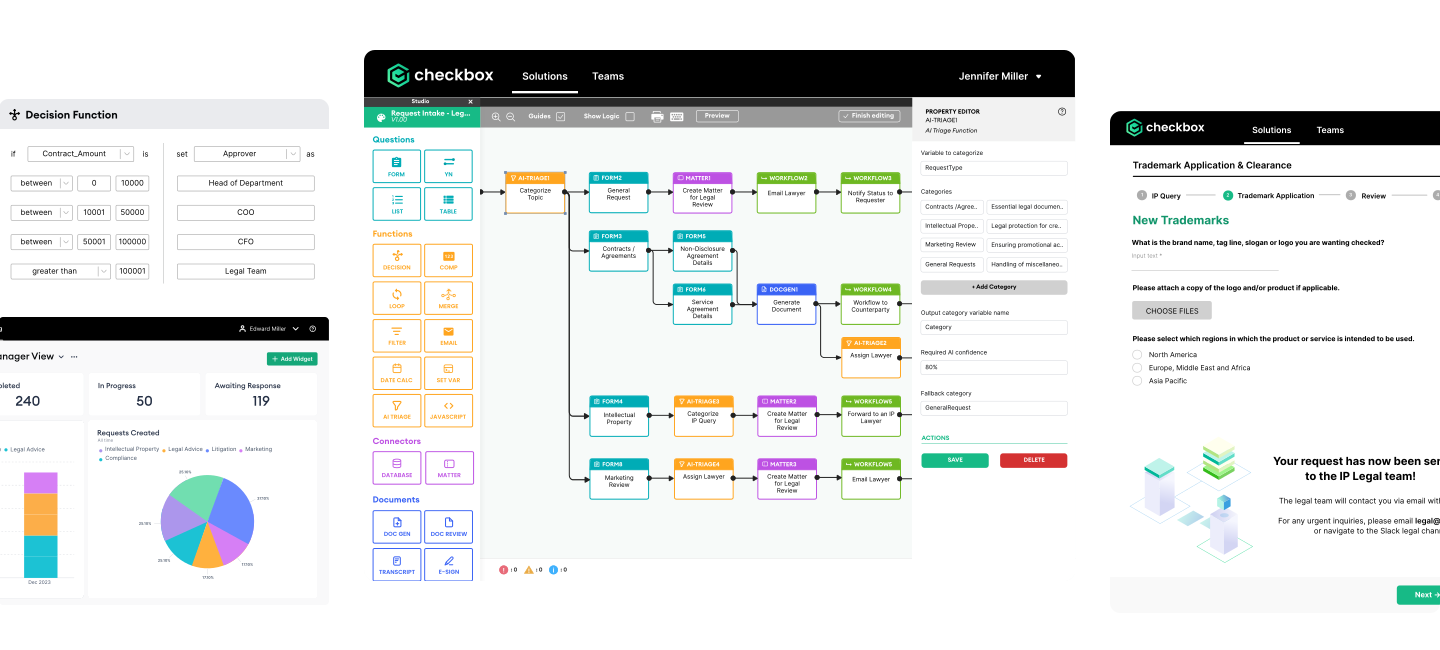
By removing repetitive work and centralizing information, Checkbox enables legal teams to work faster, with greater accuracy, and with more control over their operations.
Legal automation tools shouldn’t be clunky or complicated. Checkbox makes it easy to automate legal work with no code and no chaos. Book a demo today to see how.
Frequently Asked Questions
Why are legal workflows uniquely suited for process and task automation?
Legal workflows often involve repetitive, rules-based steps (i.e. approvals, document creation, and tracking) that follow predictable patterns. This makes them ideal for automation, which thrives on consistency and standardization.
What are signs that your current legal workflow is ready for automation?
Frequent delays, high volumes of repetitive work, and heavy reliance on manual tracking (like spreadsheets or email chains) indicate automation could save time and reduce errors.
How does automating legal workflows affect team collaboration and visibility?
Automation centralizes requests and updates in real time, so everyone can see the status of matters without chasing information. This transparency reduces miscommunication and keeps work moving smoothly.
Can process and task automation improve compliance and reduce risk?
Yes, automation enforces consistent processes, sends timely reminders, and ensures required steps aren’t missed, helping maintain compliance and avoid regulatory risks.
What challenges do legal teams face during workflow automation rollouts?
Common hurdles include resistance to change, unclear goals, and underestimating the need for stakeholder input and training. Starting small and measuring results helps overcome these issues.
How does Checkbox ensure workflows remain flexible as legal needs evolve?
Checkbox offers customizable workflows that can be adjusted as processes, regulations, or business priorities change, ensuring automation stays aligned with evolving legal needs.